| At last: GNOME adds native Exchange Server support |
Mar. 18, 2009
 The GNOME Project today achieved a new release of its popular desktop computing environment for Linux. Highlighting the GNOME 2.26 release is a version of the Evolution mail client that could finally open the door to Linux replacing Windows in the enterprise. The GNOME Project today achieved a new release of its popular desktop computing environment for Linux. Highlighting the GNOME 2.26 release is a version of the Evolution mail client that could finally open the door to Linux replacing Windows in the enterprise.
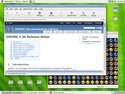
(Click for larger view of GNOME 2.26 desktop)
GNOME is the default desktop environment for most Linux distributions today (including Ubuntu, Debian, Fedora, and even SUSE). The GNOME project adheres to six month release cycles, and 2.26 appears to be arriving on time.
The 2.26 GNOME release includes a broad range of new improvements, but before delving into them, let's call out two in particular: claimed support for Microsoft Exchange Server's native MAPI protocol, and "direct" import of Outlook Personal Folders.
Last barriers fall?
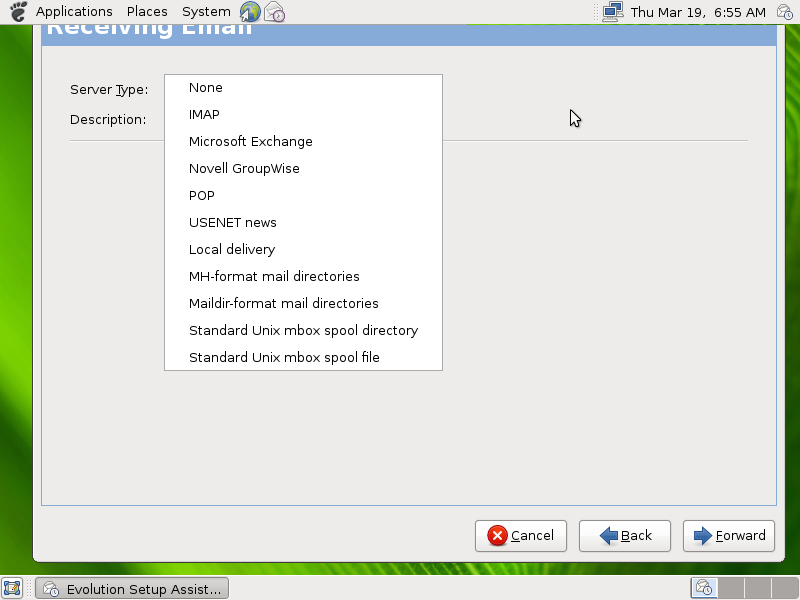
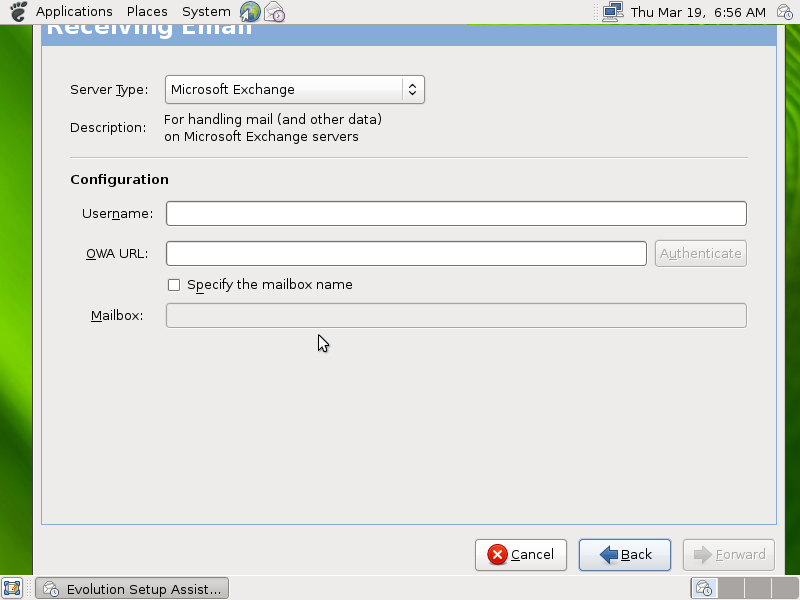
Evolution previously supported Exchange's SOAP protocol, and could of course achieve limited functionality with POP and IMAP, where Exchange administrators enabled these standard protocols. However, Linux's lack of support for MAPI has long been a barrier to more widespread Linux adoption in the enterprise.
 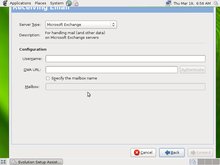
GNOME 2.26 email set-up wizard
(Click either to enlarge)
MAPI is the the protocol that Microsoft Outlook itself uses to communicate with Exchange Server. So, depending on how well the support has been implemented, Linux could soon become a much more practical Windows replacement in enterprise settings. Linux users might at last be able to blithely sharing calendars and respond to meeting invitations, advancing to the hallowed status of first-class Exchange Server citizens.
GNOME 2.26's Evolution client also supports Outlook Personal Folders. This is said to enable "direct" importation of e-mail, contacts, appointments, tasks, and journal entries. Before, you had to use another Windows email client (such as Thunderbird) to translate the data into something Evolution could understand.
Yet to arrive, however, is RPC/HTTP ("Outlook Anywhere"), which could be a show-stopper in Microsoft shops with highly mobile workforces. The feature lets remote workers interact with Exchange Server over an SSL-encrypted HTTP connection, saving them from having to fiddle with VPN (virtual private network) tunnels.
Interestingly, Novell, which funds development of the Evolution mail client, earlier this week published the results of a survey of enterprise IT professionals. Administered by IDC, the survey showed two thirds of enterprise IT professionals are already "actively evaluating" or "accelerating adoption" of Linux as a desktop client OS.
So, we're guessing that GNOME 2.26 will be getting a lot of poking and prodding over the next few months.
Other new features
GNOME 2.26 isn't all business, though. There seem to be plenty of nifty new features aimed at casual computer users. Other highly touted new features include:- A new Brasero disk burning app (screenshot) with advanced features:
- Audio CD burning with audio track preview, track splitting, and volume normalization
- "Full" multisession support
- Integrity checks
- Cover editor
- Support for multiple burning backends
- File-sharing via WebDAV, HTTP, and Bluetooth looks promising for cinchy file transfers to/from mobile devices (screenshot)
- Media Player gains support for UPnP/DLNA, the set of standards most commonly used to stream media files between devices like NAS boxes, PCs, home theater gear, and so on.
- Volume Control (screenshot) now supports PulseAudio, a cross-platform, high-resolution desktop audio mixer that seems to be replacing ESD (enlightened sound daemon)
- Display Settings simplifies multi-monitor setup (screenshot)
- Empathy (IM client) gains all kinds of improvements, notably file transfers and IP videoconferencing via speex/theora and Jingle (screenshot)
- Epiphany (the lightweight browser used mostly for help) gains the annoying "AwesomeBar" made popular (and seemingly impossible to disable in) Firefox 3.0 (screenshot)
- About Me dialog gains fingerprint enrollment (for biometric ID purposes on devices that have that)
- Orca Screenreader (an "accessibility" feature) claimed less buggy
- Languages with at least 80 percent of GNOME's text strings translated now number 48
- GTK+ 2.16 integration
A few additional features for developers are listed on the release page, here.
Availability
GNOME 2.26 will gradually be tested and integrated by major Linux distributions over the next few months. Much of the software (such as Brasero) has long been available in the development branches of the big distros (i.e., Debian, Fedora, and OpenSUSE).
For those (ahem, IT administrators) who want to get a jumpstart, the GNOME Project offers "Live" QEMU/Parallels harddrive images and VMWare images (player/workstation and ESX Server flavors), as well as an installable DVD, on the GNOME Live page, here. And, more about the Evolution client may be available on its GNOME Project page, here.
The GNOME 2.26 release was announced by Vincent Untz, GNOME Release Manager, in a message to the GNOME Announce list.
In homage to the importance of email, let's end this story like so:
.
-- Henry Kingman
Do you have comments on this story?
Talkback here
NOTE: Please post your comments regarding our articles using the above link. Be sure to use this article's title as the "Subject" in your posts. Before you create a new thread, please check to see if a discussion thread is already running on the article you plan to comment on. Thanks!
Related Stories:
(Click here for further information)
|
|
|
|
|
|
|
|