| Via, Puppy Linux tout "affordable" computing |
Dec. 01, 2006
 Puppy Linux was guest-of-honor at an "Affordable Community Computing Workshop" this week in the Philippines, where participants assembled and took home ultra low-cost, PC-like computing devices. The workshop was sponsored by Via and several organizations working to close the "digital divide" in the Philippines. Puppy Linux was guest-of-honor at an "Affordable Community Computing Workshop" this week in the Philippines, where participants assembled and took home ultra low-cost, PC-like computing devices. The workshop was sponsored by Via and several organizations working to close the "digital divide" in the Philippines.
Spread the word:
digg this story | |
At the workshop, Dr. Raffy Mananghaya, a professor at the University of the Philippines, led non-technical particants in assembling PC-like computing devices that eschew hard drives, instead booting Linux from CD-ROM, and running it in a ramdisk, storing user preferences across reboots on a small removable flash storage card.
The market for ultra-low cost computing devices appears to be flourishing. Systems similar to those built at the workshop are available for about $100 from Bangkok-based Nohrtec, as well as E-Way Co, which took part in the workshop.
The workshop was organized by board and chipmaker Via, as part of its "PC-1" initiative, aimed at "enabling the next one billion people to get connected," as Via puts it. The PCs that participants built were based on Via's PC1000 board, one of three ultra low-cost boards developed for the PC-1 program.
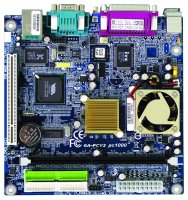
Caption
(Click to enlarge) |
The PC1000 board (pictured at right) features a Via C3 processor clocked at 800MHz. Other PC-1 program boards include the PC1500, based on a 1GHz C3 processor, and the PC2500, based on Via's carbon-free C7-D processor clocked at 1.5GHz. Additionally, the Via PC-1 program has produced reference designs for power-saving PCs, thin clients, notebooks, and computing appliances. Details can be found here.
According to an account of the workshop on Via's PC-1 website, participants were initially skeptical of their own ability to assemble and use a PC. However, the assembly and testing phase lasted only an hour, without a single failure. Participants left impressed by how simple it is to assemble an embedded computing appliance -- and with the speed and completeness of Puppy Linux, even on extremely resource-limited hardware.
Puppy Linux is a small, high-efficiency distribution with a user interface similar to Windows 98, except lighter and faster. Despite low hardware requirements, it aims to include a full range of productivity software, including heavily pared-down versions of OpenOffice and Firefox. Puppy runs entirely out of a ramdisk on systems with 128MB or more of memory, and can easily be loaded from CDs or flash drives in systems that lack hard drives. The latest release of Puppy happened in September; a slideshow of screenshots can be found here.
The Affordable Community Computing Workshop was a pilot program created as part of Via's "PC-1" initiative, and similar events may be held in the future, Via says. Other workshop participants and sponsors include the National Computer Center in Manilla, and Philippines-based NGOs (non-government organizations) ADOC (APEC Digital Opportunity Center) and the III (Institute for Information Industry). Integrator eWay Co also took part.
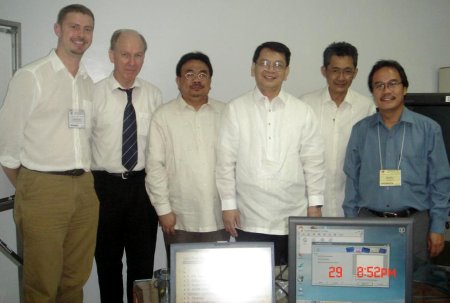
Affordable Community Computing Workshop sponsors
(From left: Ulten Ryan, of ADOC; Steve Freiberger, of eWayco; Phillipines Education Commissioner Emmanuel Lallana, Commission Chairman Ramon Sales, Cyberservices Commissioner Monchito Ibrahim, and Professor Raffy -- click image to enlarge)
Richard Brown, Via's VP of Corporate Marketing, stated, "VIA's highly energy efficient pc-1 hardware and the flexible Puppy Linux GPL/free software combine to form a powerful solution for enabling community computing in all emerging markets, in line with our VIA pc-1 vision."
Related Stories:
(Click here for further information)
|
|
|
|
|
|
|
|


