| Review: Novell software easiest yet at building Linux appliances |
Aug. 04, 2009
 Novell's new SUSE Studio web-based service for creating software appliances on SUSE Linux has been favorably reviewed by eWEEK. While SUSE Studio does not offer the breadth of features of rPath's rBuilder, Novell's product is much easier at appliance creation, says the review. Novell's new SUSE Studio web-based service for creating software appliances on SUSE Linux has been favorably reviewed by eWEEK. While SUSE Studio does not offer the breadth of features of rPath's rBuilder, Novell's product is much easier at appliance creation, says the review.
SUSE Studio is a free, web-based service designed to build virtual appliances, such as pre-installed hardware-appliances, or "software appliances" -- pre-configured Linux server stacks suitable for installation by users on real or virtual commodity hardware. Recently released from beta, SUSE Studio can produce appliance images in raw disk image, Live CD/DVD iso, VMware, and Xen formats, and there are plans in the works for supporting Amazon's EC2 ami format, says the review by our sister publication, eWEEK.
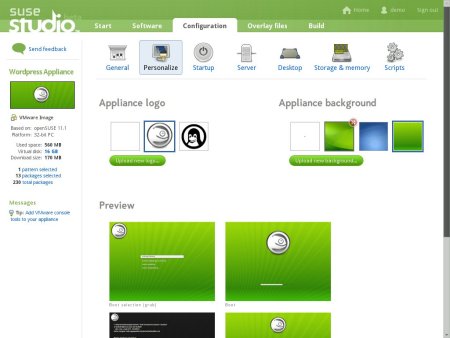
SUSE Studio appliance personalization features
(Click to enlarge)
SUSE Studio is part of Novell's SUSE Appliance Program, which eWEEK describes as an initiative intended to streamline product delivery and maintenance for ISVs by enabling them to bundle their wares with everything required for direct deployment to virtual, physical, or cloud-based infrastructure.
In a major study of the Linux market released in April, IDC touted software appliances as an opportunity for Linux. These turnkey software stacks, which combine the OS, middleware, "other infrastructure software components," and in some cases, even application software, are quickly replacing discrete software stacks, said IDC.
RPath rBuilder
The best known software appliance development program is rPath's rBuilder, which can be used to develop hardware and software appliances, as well as other types of virtual appliances. Digium, for example, tapped rPath's rBuilder for its AsteriskNow software appliance, an open-source IP PBX (private branch exchange) system.
Ironically, SUSE Linux was until recently the only major distribution supported by rBuilder. Last December, rBuilder added support for Ubuntu and CentOS Linux in addition to SUSE and rPath's own rPath Linux distribution.
The rBuilder tool reflects rPath's motto of "Just Enough OS" (JeOS), creating minimal filesystem images particularly suitable for deployment in virtualized environments. The software also feature's rPath's Lifecycle Management Platform, which is aimed at managing application images in virtualized environments, via a web interface.
Jason Brooks, who reviewed SUSE Linux for eWEEK, also reviewed rBuilder 5.2.1 about a week ago, praising it for its breadth of features and easy development of virtual images. While it was a favorable review overall, Brooks criticized the software for its fairly difficult application configuration and appliance development process (see links to both reviews at the end of this article).
SUSE Studio: Ease of use trumps feature flexibility
By comparison, SUSE Studio is far easier at appliance creation, writes Brooks, and in fact "handles appliance creation tasks better, by far, than any such tool I've tested." Brooks was able to carry out most customization tasks before ever booting into his custom Linux images, "using the service's excellent Web interface." The software "significantly streamlined the task of locating applications or application versions not available in the default SUSE repositories through integration with the openSUSE Build Service," writes Brooks.
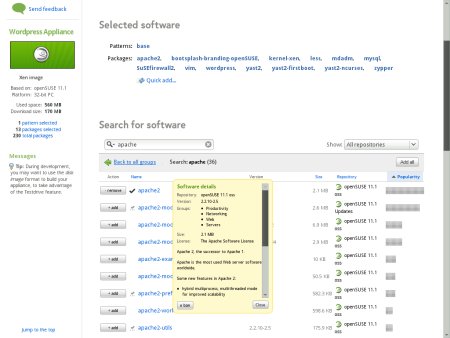
SUSE Studio software selection
(Click to enlarge)
Brooks was particularly enthused with SUSE Studio's Test Drive option, which saved download time by enabling him to test his image on the SUSE Studio servers before it was downloaded. "I was also impressed to find that I could pull up a list of any files I modified during my test drive, and add those changes to the appliance image to be applied after another build operation," he writes.
SUSE Linux does have its limits, according to Brooks. For example, rBuilder is said to support a broader set of appliance management and deployment tasks, and offers greater Linux distribution support. In addition, SUSE Studio supports fewer virtualization and cloud computing services as deployment targets, and "offers no facilities for directly launching or terminating the virtual instances it creates," writes Brooks.
Yet in the end, Brooks seems to conclude that most software appliance developers will get by just fine, despite this early version's constraints, and save themselves a lot of time in the process. "SUSE Studio could prove very useful for any individual or organization that uses Novell's Linux distributions by easing complex customization tasks," writes Brooks.
Welcoming Novell to the party
For its part, meanwhile, rPath published an open letter to Novell from VP of marketing Jake Sorofman, proclaiming "Welcome to the party!" However, Sorofman, who noted that rPath pioneered the software appliance category some three years ago, wanted to set the record straight regarding Novell's marketing of SUSE Studio as the "industry's first solution for creating and deploying fully supported software appliances."
After scolding Novell for excessive exaggeration, Sorofman writes that "it is great news that Novell has made appliances a strategic priority, much as VMware and others have." Sorofman continues, "This substantiates the market we've defined and helps to shine a light on the virtues of this form factor for application delivery."
Availability
SUSE Studio is now out of beta and available for free download, here. Jason Brooks' eWEEK review, "SUSE Studio is a boon for organizations using Novell's Linux distros," may be found here, and a recent eWEEK slide show of SUSE Linux features may be found here.
Brooks' recent review of rPath's rBuilder 5.2.1 may be found here.
Jake Sorofman's open letter to Novell on the rPath site may be found here.
-- Eric Brown
Do you have comments on this story?
Talkback here
NOTE: Please post your comments regarding our articles using the above link. Be sure to use this article's title as the "Subject" in your posts. Before you create a new thread, please check to see if a discussion thread is already running on the article you plan to comment on. Thanks!
Related Stories:
(Click here for further information)
|
|
|
|
|
|
|
|